Get the link to change the password

E-mail *

Send
Give up
logo
022 822 024

Assistment and Call Center

New account

New account

First name *
The field will be filled with letters (A to Z), who will be reflected at articles and comments
Last name *
The field will be filled with letters (A to Z), who will be reflected at articles and comments
Login *
The field will be filled with letters (A to Z) and/or numbers, without free spaces. Can be used the symbols, except the symbol _
E-mail *
The field will be completed with un valid e-mail. To this e-mail will be sent the confirmation link about the registred user account
Password *
The password will be contain at 5 to 15 characters and will be different for the date indicated at the login, name and firstname

Repeat password *

Cancel
Sign in

Sign in

Sign in can be to do with e-mail adresss or login

E-mail/Login *

Password *

Sig in with your Google account
MPass authentication
Cancel

Get the link to change the password

E-mail *

Send
Give up
EN
  • RO
  • RU
  • EN
RORUEN
logo
DailyThe expert position Related sectionAccounting sectorServices14Info-videoContacts

PP „Monitorul Fiscal FISC.MD”

MD-2005, Kishinev
Constantin Tanase street, no. 6
Inside „Fertilitatea-Chișinău” Corporation., 3-th floor, office 320

Antechamber:

022 822 024

E-mail:

secretariat@monitor.tax

Support and Contact Center:

022 822 024

You want to obtain an operative and complex answer?

Send your question and obtain the answer from the experts in the shortest time, at your e-mail or published in the compartment „Questions and answers”

Ask us a question

Ask us a question

You want to obtain an answer or you will can to suggest as an article necessary for your work process? Sign in on the page, send your question or suggest and obtain the answer from the experts in the shortest time, at your e-mail or published in the compartment „Questions and answers”.

E-mail: *

Message *
Message
0/500
Cancel the message
ArhivaFrequent questionsTerms and conditions of use of the page Privacy policyInstrucțiuni pentru ștergerea contului

Subscription at Newsline

facebooktwitterlinkedintelegraminstagramgoogle
Amex logoMAIB logoMasterCard logoVisa logo

Site version: 1.0

Copyright 2021

All riths on the page monitorul.fisc.md belongs P.P. „Monitorul Fiscal FISC.MD”. Full or partial reproduction about informations or illustrations in either compartment is possible only with the written consent of the publication. Intellectual piracy is punishable by law.

icon

Feedback

To monitor the status of sent Feedback, initial we recommend to you to do sign in on the page. So, the answer at PP „Monitorul Fiscal FISC.md” at feedback will be save and will be displayed in your personal profile. If the feedback is sent an you aren't authentificated on the page, the message will be sent tot your e-mail.

E-mail: *

Message *
Message
0/500
Cancel the message
iconiconicon
icon
Facebook iconTwitter iconLinkedIn iconTelegram iconVK icon
icon
  • Home page
  • Catalogul autorilor
  • Zahari Pascalov

Availables services

For the command select the service you want from the category

icon

In-room training services, online, guides

icon

Subscribe to the periodical publication

icon

Library

icon

Advertising

img
icon

Search from the cathegory

Search in the category

The period of publication

at

to

Compartment page

Subcompartment page


Keyword

Present the results
Cancel

Zahari Pascalov

Zahari Pascalov

director EcontProf SRL, certificat CAP
Лицензирование 1С

Лицензирование 1С

Эту статью мы посвящаем вопросам лицензирования продуктов 1С. Наша цель – предоставить читателю наиболее полную информацию о правилах эксплуатации продуктов 1С в коммерческих целях.

17 November /2015 09:20

Zahari Pascalov

Facebook iconTwitter iconLinkedIn iconTelegram iconVK icon
icon
"1C: Întreprindere". Lecția nr. 10 Rapoarte în sistemul «8.Х»

"1C: Întreprindere". Lecția nr. 10 Rapoarte în sistemul «8.Х»

Aspectul teoretic al rapoartelor este descris în lecția nr. 4 în contextul 1C, versiunea 7.7. Pentru a înțelege mai bine sistemul de raportare în versiunea 8, o să ne reamintim de unele aspecte de bază. Orice raport în «1C» are o formă de vizualizare. De asemenea, puteți întâlni unele surse care clasifică acest termen ca ”fereastra de dialog”, aceasta este aceeași formă de vizualizare.

16 April /2014 12:06

Zahari Pascalov

Facebook iconTwitter iconLinkedIn iconTelegram iconVK icon
icon
«1С: Предприятие». Урок №10 Отчетность в системе 1С 8.х

«1С: Предприятие». Урок №10 Отчетность в системе 1С 8.х

Дорогие читатели! Наконец-то завершился период годовой отчетности, и мы рады продолжить цикл уроков для пользователей 1С. Теоретический аспект 1С отчетности изложен в уроке №4 в контексте 1С Предприятие, версия платформы 7.7. Для того чтобы перейти к пониманию отчетности системы 8, освежим в памяти некоторые общие понятия.

10 April /2014 10:48

Zahari Pascalov

Facebook iconTwitter iconLinkedIn iconTelegram iconVK icon
icon
dna1s7k9v2.png
(Видео)«1С: Предприятие»: Урок №8 Справочники в системе «8.Х»

(Видео)«1С: Предприятие»: Урок №8 Справочники в системе «8.Х»

Уважаемые читатели, рад приветствовать вас в разделе Путеводитель «1С Предприятие». Сегодня мы, опираясь на знания, полученные на предыдущих уроках в пользовании справочниками 1С 7.7, проведем аналогию и научимся пользоваться справочниками 1С Предприятие 8.1, 8.2 Объекты прикладного решения «Справочник» позволяют хранить в информационной базе данные, имеющие одинаковую структуру и списочный характер. Это может быть, например, список сотрудников, перечень товаров, список поставщиков или покупателей. Помимо кода и наименования, каждый элемент справочника, как правило, содержит некоторую дополнительную информацию, которая подробно описывает этот элемент.

10 January /2014 11:41

Zahari Pascalov

Facebook iconTwitter iconLinkedIn iconTelegram iconVK icon
icon
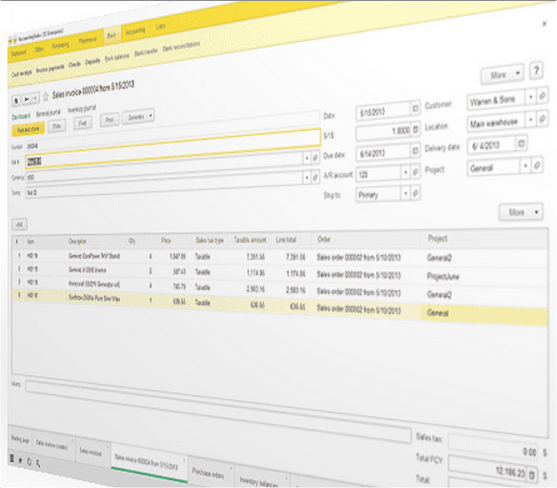
(Видео)«1С: Предприятие» Урок №7. Введение в 1С 8.X

(Видео)«1С: Предприятие» Урок №7. Введение в 1С 8.X

Уважаемые читатели, рад приветствовать вас в разделе «Путеводитель 1С». Сегодняшняя наша статья весьма необычна. Как вы могли заметить, в предыдущих статьях мы употребляли термин «пользователь «1С Предприятие 7.7». С сегодняшней статьи и далее мы будем использовать термин «пользователь «1С Предприятие». Связано это с тем, что наша задача – научить вас работать с системами 1С вообще, которые могут быть разработаны на базе платформы 7.7, 8.0, 8.1, 8.2, 8.3. Не важна версионность платформы, принципы едины для всех. Сегодня уже не редкость бухгалтер, совмещающий в своей работе несколько вариантов программного обеспечения, на различных платформах, от разных разработчиков.

11 December /2013 18:46
Zahari Pascalov

Facebook iconTwitter iconLinkedIn iconTelegram iconVK icon
icon
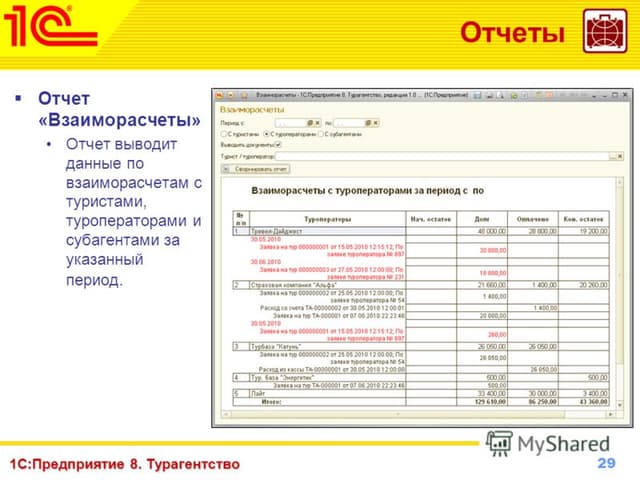
(Видео)«1С: Предприятие» Урок №5. Журналы документов

(Видео)«1С: Предприятие» Урок №5. Журналы документов

Продолжаем теоретическую часть курса «Путеводитель 1С». Эта статья познакомит вас с прикладными объектами «Журналы», «Константы», «Обработки».

31 October /2013 09:49
Zahari Pascalov

Facebook iconTwitter iconLinkedIn iconTelegram iconVK icon
icon
(Видео)«1С: Предприятие» Урок № 4. Отчеты

(Видео)«1С: Предприятие» Урок № 4. Отчеты

Доброго времени суток, уважаемые читатели. В продолжение нашей рубрики рассмотрим прикладной объект «Отчет», его назначение, сферу применения и руководство пользователя. Начнем с небольшого теоретического введения и сформируем у читателя правильное понимание отчетности с точки зрения системы «1С: Предприятие».

15 October /2013 13:23

Zahari Pascalov

Facebook iconTwitter iconLinkedIn iconTelegram iconVK icon
icon
12